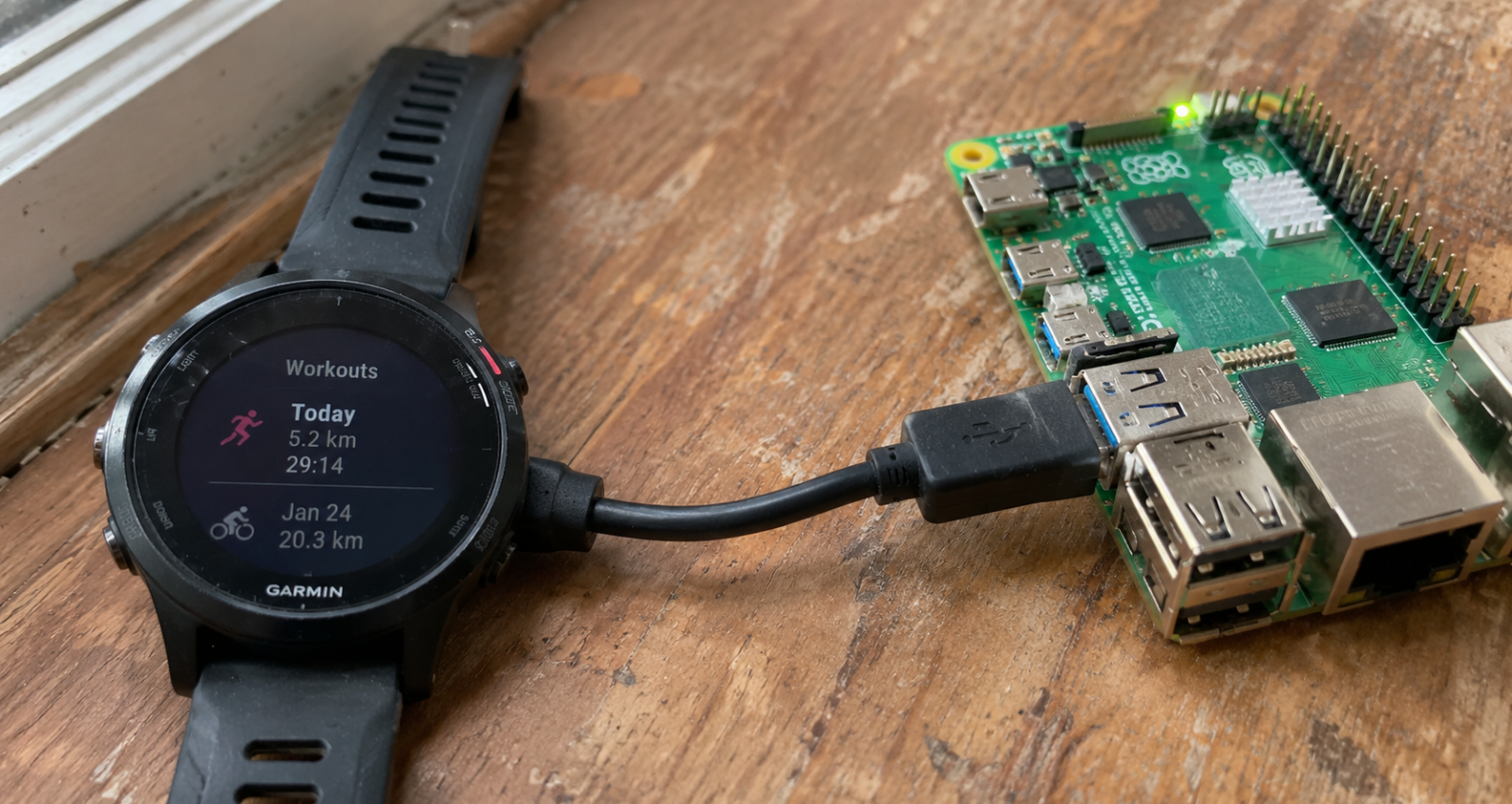
Yes, you can use a Garmin watch without Garmin Connect. The watch records each workout on its own as a FIT file, and a Raspberry Pi can copy those files over USB with no Garmin account involved. The garmin-grafana project is the exception. It logs into Garmin's cloud and does not read the watch directly, so it keeps you tied to Connect.
Can the watch really work without Garmin Connect?
It can, because the recording happens on the watch. Each activity is stored there as a FIT file, and the file holds more than a route and a pace. The maintainer of GarminDB, an open-source project that keeps Garmin data in a database, explains that a FIT file carries sleep level over time, oxygen levels on watches that measure them, breathing rates and heart rate.
Those readings sit in the watch's storage before any phone is involved, which is why some of the data Connect shows can be reconstructed from the files alone. Connect adds an account, a cloud sync and Garmin's own calculations on top of them. Without Connect the watch still records, and the result is a file you can copy, not an entry in an account that someone else runs.
Is garmin-grafana really self-hosted?
garmin-grafana is a Python script, packaged with Docker, that fetches Garmin health data into an InfluxDB database, built for version 1.11, so that Grafana can chart long-term trends. It needs a Linux environment. At setup it asks for your Garmin Connect credentials, and the project says plainly where the data comes from: "This does not directly sync data from your watch."

So the data goes from the watch through the normal Connect sync to Garmin's cloud, and only then down to the script. The project warns that Garmin limits repeated login attempts from the same IP address to protect the account. The Connect login brings sleep data with SpO2, breathing rate, sleep movements and HRV, plus Body Battery, while the project's FIT importer is documented for importing activity .FIT files.
The FIT files themselves hold sleep level by time, oxygen levels if the watch supports it, breathing rates and heart rate, but garmin-grafana's sleep and Body Battery data come from the Garmin cloud. The result is a local copy of a cloud account, and the copy only grows while the account and its sync stay in use. garmin-grafana needs a Garmin Connect login, because it depends on Garmin's cloud and does not sync directly from the watch. It is not self-hosted in the sense that matters here, a watch whose data never passes through Garmin's servers.
How do you get FIT files off without the cloud?
Older Garmin watches mount as a USB mass storage device, so a Pi sees an ordinary drive and the FIT files can be copied off directly. More recent watches use MTP (Media Transfer Protocol) and don't show up as a drive. So check this first. Plug the watch into any computer. If it appears as a drive, you have the simpler of the two setups below.
A 2022 guide to syncing FIT files with a Pi covers both kinds. You need a Pi and the watch's own USB cable. For a watch that mounts as a drive, a udev rule (a rule that runs a command when a device is plugged in) fires when the watch connects. It starts the fit-sync-usb script, which copies all the FIT files off the watch into a local folder. The Pi then shares that folder over Wi-Fi as a network drive.
For an MTP watch, the guide uses jmtpfs to open the watch's storage, because an MTP watch does not mount as a drive. Once the storage is open, the FIT files go into the same local folder and the same Wi-Fi share. This is where the two setups get mixed up most easily: a Pi set up only for watches that show up as drives can't open an MTP watch until jmtpfs is in place.
The same folder can also go into garmin-grafana. Its fit_activity_importer.py script loads FIT files saved locally into the same InfluxDB database. It handles activities only, so it adds workouts to a setup that still depends on Connect. The USB copy itself never logs into Garmin, so the login limit doesn't apply to it.

Which dashboard reads those files?
What decides it is whether a Garmin account sits anywhere in the chain. Endurain, a self-hosted fitness tracking service, comes as a Docker image, stores its data in PostgreSQL and accepts manual uploads of .gpx, .tcx and .fit files. FIT Dashboard is free, open source and runs entirely on your own machine, and there is also a Docker web version. GarminDB can download and parse data from Garmin Connect or from a Garmin watch, stores it in SQLite and requires Python 3.x.

Endurain takes manual .fit uploads and needs no Garmin account, so files from the Pi's folder can be uploaded by hand with no Garmin login anywhere in the chain. FIT Dashboard imports raw .fit files either individually or in bulk from a Garmin Connect data export. After the first import, the app creates a fit-files sync folder where FIT files can be dropped and synced directly. GarminDB can keep FIT files to regenerate its SQLite database.
What do you give up?
Garmin's documented update route is Garmin Express, which you install before you can update the watch software. Garmin Express is available for Windows and Mac computers, so a Pi can't run it, and the documented update route needs one of those computers. The USB copy doesn't replace that route, because copying takes data off the watch and puts no software onto it.
Body Battery trends are the second thing tied to the account. Garmin computes Body Battery from heart rate variability, stress, sleep and activity, and Connect shows its trends after a sync, so the trend view depends on the Connect account. Sleep splits along the same line. The raw sleep levels sit in the FIT files the Pi copies, while garmin-grafana's sleep panels come through its Connect login.
What Pi and what backup?
For Raspberry Pi OS with the desktop, Raspberry Pi recommends an SD card with at least 32 GB of storage. Its recommended power supply is a 27 W USB-C unit for the Pi 5 and a 15 W unit for the Pi 4, so buy to the figure for your board. Along with the watch's own USB cable, those are the parts the USB route described above uses.
The folder of raw FIT files is your archive. GarminDB, as noted above, can rebuild its SQLite database from kept FIT files, and Endurain and FIT Dashboard both import .fit files. The guide already shares the folder over Wi-Fi, so a second computer on the same network can keep a copy that doesn't depend on the Pi's card.
Moving your Garmin data to a Pi costs you Connect's Body Battery trends and sleep views and leaves firmware updates to Garmin Express on a Windows or Mac computer, and in return the files you copy off the watch stay on hardware you own.

Duarte Lemos writes about the Raspberry Pi and what small boards can and cannot do for retro gaming. He lives in Porto, near the Bolhão market, and keeps a drawer of old cables he refuses to throw away. He also follows hardware news.
16 articles →