The Zero 2 W is often described as just a faster Zero W. The memory is what made me curious. The Zero, Zero W and Zero 2 W product pages all list 512MB. The newest board also keeps selling out. So which Raspberry Pi Zero should I buy, and what will each one run? The first clue is in the letters at the end of each board's name.
What separates the four Zero boards?
The Raspberry Pi documentation for the Zero family explains the letters. A W marks a wireless radio, and an H marks a soldered header. Models without the H come with unpopulated holes where the pins would go.
The bigger split is the processor. The same documentation says the Zero, Zero W and Zero WH use the Broadcom BCM2835. That chip is a 1GHz single-core 32-bit ARM11. The Zero 2 W product page lists a 1GHz quad-core 64-bit Arm Cortex-A53 instead. The board keeps the same 65mm x 30mm size as the older Zeros. Raspberry Pi's launch post adds that almost all Zero cases and accessories should fit it.
Launch prices rose in steps of $5. The Zero W launch post gives both early prices. The Zero arrived in November 2015 at $5, and the Zero W followed at $10. That post says the Zero W added a CYW43438 radio and kept the Zero's other specs. The Zero 2 W costs $5 more than the Zero W, which matches its $15 list price.
The original Zero has the BCM2835 and 512MB. Its product page lists a mini HDMI port and a micro USB OTG port. Its CSI camera connector takes v1.3 only. With no W in its name, it has no radio. Its header holes are bare, and it launched at $5.
The Zero W pairs the same processor with the same 512MB. Its page lists 802.11 b/g/n Wi-Fi and Bluetooth 4.1. Its header is also unpopulated, and it launched at $10. The Zero WH is a Zero W with the header already soldered on. The Zero 2 W has the quad-core A53 and 512MB. It lists 2.4GHz Wi-Fi, Bluetooth 4.2 and Bluetooth Low Energy. Its header footprint is bare, but a version with headers is also sold. It lists at $15 and runs multi-threaded sysbench about five times faster than the original Zero.

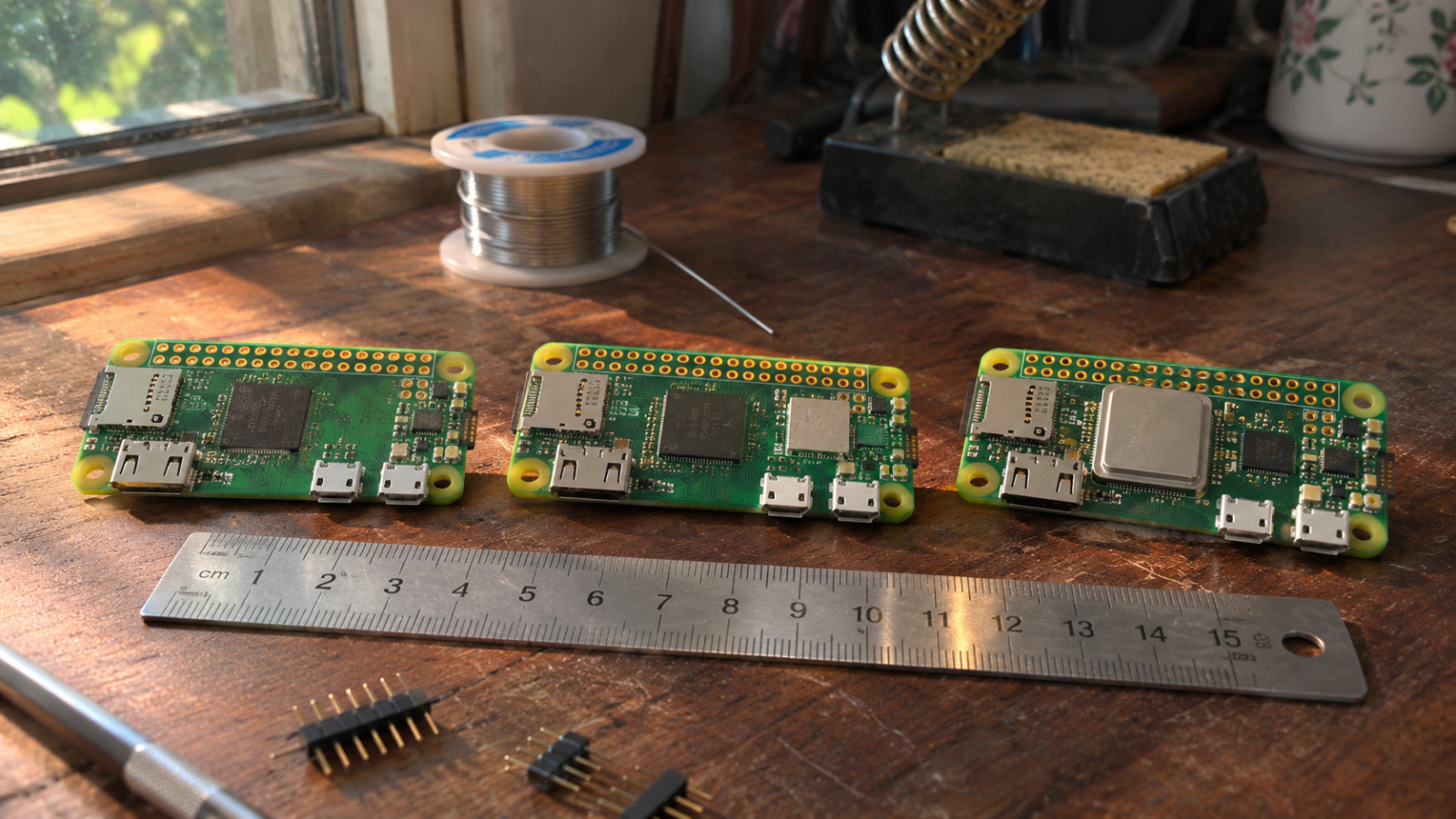
The photo shows a Zero 2 W with its 40-pin header soldered on. That is the with-headers variant its product page mentions. Look along the long edge. On a board without the header, that row is a line of bare holes.
How much faster is the Zero 2 W?
The official answer is five times the original Zero. The Zero 2 W launch post says it runs multi-threaded sysbench almost exactly five times faster. The product page words it more loosely, as up to five times as fast.
Where does that speed come from? The launch post says the Zero 2 W uses the BCM2710A1 die from the Pi 3. On the Zero 2 W it is clocked down to 1GHz and paired with 512MB of LPDDR2. The Zero documentation names the part differently, as the RP3A0 system-in-package. So Raspberry Pi's own pages use two names for this chip, and neither page explains the other.
What does the five times leave out? The test is multi-threaded, so it sets four cores against one at the same 1GHz. It does not show how a program that uses a single core compares. It also says nothing about memory, and both the Zero W and Zero 2 W have 512MB.
What can 512MB actually do?
The clearest reports on 512MB come from owners rather than Raspberry Pi. In a MagicMirror forum thread about running that project on a Zero 2 W, users call Chromium "an extremely memory hungry program". Their advice is to add swap. These are forum anecdotes, not official figures.
With memory equal across the family, the choice comes down to radio, header and cores. Under the documentation's naming, only a board with a W has a radio. A project that switches pins or reads a sensor offline has no use for one, so the original Zero covers it. A project that needs Bluetooth Low Energy points to the Zero 2 W, whose page lists BLE beside Bluetooth 4.2. Work split across several threads also points to the Zero 2 W, the only Zero with four cores. For a camera project on the original Zero, its page lists the CSI connector as v1.3 only.

Two details in the Raspberry Pi hardware documentation matter before buying. It notes that on some Zero models the GPIO header has no pins attached. Using jumper wires or a HAT then means soldering pins on yourself. The other route is an H board or a Zero 2 W sold with headers. The same documentation says the Zero family has a single micro-USB port for data.
Which one can you actually buy?
The Zero 2 W lists at $15, but finding one at that price is hard. Raspberry.tips reports that it arrives in small batches that often sell out within days. On 18 November 2026 it was out of stock at Adafruit and PiShop.us. The site blames a bottleneck in substrate, the base layer a chip package is built on. No source gives a date for steady supply.
Street prices sit far above the list price. The same report found Amazon.de listings at about €60. A Seeed kit with the header fitted cost $25.19.
Raspberry.tips also says there is no drop-in replacement and names the Pi 3 A+ as an alternative. Inside the Zero family, the fallback is the Zero W. Its product page promises production until at least January 2030. The Zero 2 W page gives the same date. The Zero W keeps the radio and 512MB, with one core instead of four.

The chart sets launch price beside sysbench speed. On the left, look at the two equal $5 steps. The step from Zero to Zero W bought a radio and no extra speed, since the Zero W kept the Zero's other specs. The speed panel on the right shows only the original Zero and the Zero 2 W. That is the pair the launch post measured. The Zero 2 W bar stands about five times taller.
My pick is the Zero 2 W at or near its $15 list price. At about €60 on Amazon.de it is still the same board with the same 512MB. When none is in stock, the Zero W keeps a radio on one core. The original Zero still suits offline pin projects that need no radio.
The memory surprised me most. The Zero 2 W has the same 512MB as the $5 Zero from November 2015. All of its five-times gain sits in the processor.
Method note: every figure comes from the published pages linked above. These are published results, not bench tests.

I test how tiny AI models behave on low-cost boards such as the Pi Zero. My reviews focus on speed and memory limits.
3 articles →